You know the feeling. The laptop is open on the kitchen table, the mug is balanced beside a pile of papers, and every time the phone rings you’re clearing space just to find a mouse pad. In a small flat, a spare corner, or a bedroom that doubles as an office, the question isn’t whether you need a desk. It’s whether the desk can earn its keep every day without taking over the room.
A small home office desk solves a real Canadian work pattern, not a niche decorating problem. Statistics Canada found that 32% of employees aged 15 to 69 worked most of their hours from home at the beginning of 2021, compared with 4% in 2016, and it estimated that roughly 40% of Canadian jobs could plausibly be done from home Statistics Canada. That shift makes compact desks a practical part of daily work life, especially where floor space is already spoken for by a bed, dining set, or shared household storage.
Table of Contents
- Why a Small Home Office Desk Is a Daily Habit, Not a Niche
- Reading the Footprint Before You Fall in Love with a Style
- Ergonomics That Survive a Smaller Surface
- Storage and Multipurpose Designs That Earn Their Footprint
- Where to Put the Desk So the Workday Has a Shape
- Choosing Between Compact, Foldable, and Wall-Mounted Designs
- Putting It All Together and Next Steps
Why a Small Home Office Desk Is a Daily Habit, Not a Niche
A tiny desk in a bedroom looks harmless until you sit down with a monitor, keyboard, notebook, lamp, and charging cables. Suddenly the “compact” top has to compete with everything else in the room, and the compromise shows up fast in elbow room, glare, and clutter. That’s why choosing a desk is less about buying the smallest frame that fits a wall and more about picking a work surface you can live with all week.
In Canada, the need for compact setups isn’t limited to a pandemic memory. Statistics Canada reported that from April 2020 through June 2021, 30% of employees aged 15 to 64 who worked during the Labour Force Survey reference week performed most of their hours from home, and by October 2021 23.8% of Canadian workers, about 4.2 million people, were working from home Statistics Canada. That’s a durable change in how homes are being used, especially in places where a workstation has to share square footage with everything else.
What that means in practice
A small desk isn’t a toy version of a real desk. It’s a full workstation that has to support daily use, then disappear visually enough that the room still feels like a home. In my experience, the best compact setups are the ones that accept that tension instead of fighting it. They keep the desktop clear, the chair movable, and the work area defined.
Practical rule: If the desk only works when the room is otherwise empty, it’s too fragile for real life.
That’s the key difference between a desk that photographs well and one that survives months of use. A good small desk gives you enough surface for the job, then leaves enough room for the rest of the household to function normally.
Reading the Footprint Before You Fall in Love with a Style
The biggest mistake with a compact desk is reading the product page as if width alone decides everything. It doesn’t. A desk can be narrow and still work beautifully if the depth, leg shape, and knee opening are right, while a wider top can still feel cramped if the screen lands too close to your face or the centre brace steals your leg room.
Measure the work zone, not just the wall
Start with the body, then the furniture. Sit in the chair you use, place your feet where they normally rest, and mark the space your knees and elbows naturally need. Then measure from the wall forward to where the monitor would sit, because depth is what decides whether you can work upright or end up leaning in all day.
A useful mental check is simple. The centre of the desk should hold the keyboard and mouse comfortably, the display should sit directly ahead, and the sides should leave just enough room for elbows without forcing you into a hunched posture. If the top looks generous in a product photo but the front edge is doing all the work, it’s probably the wrong shape.
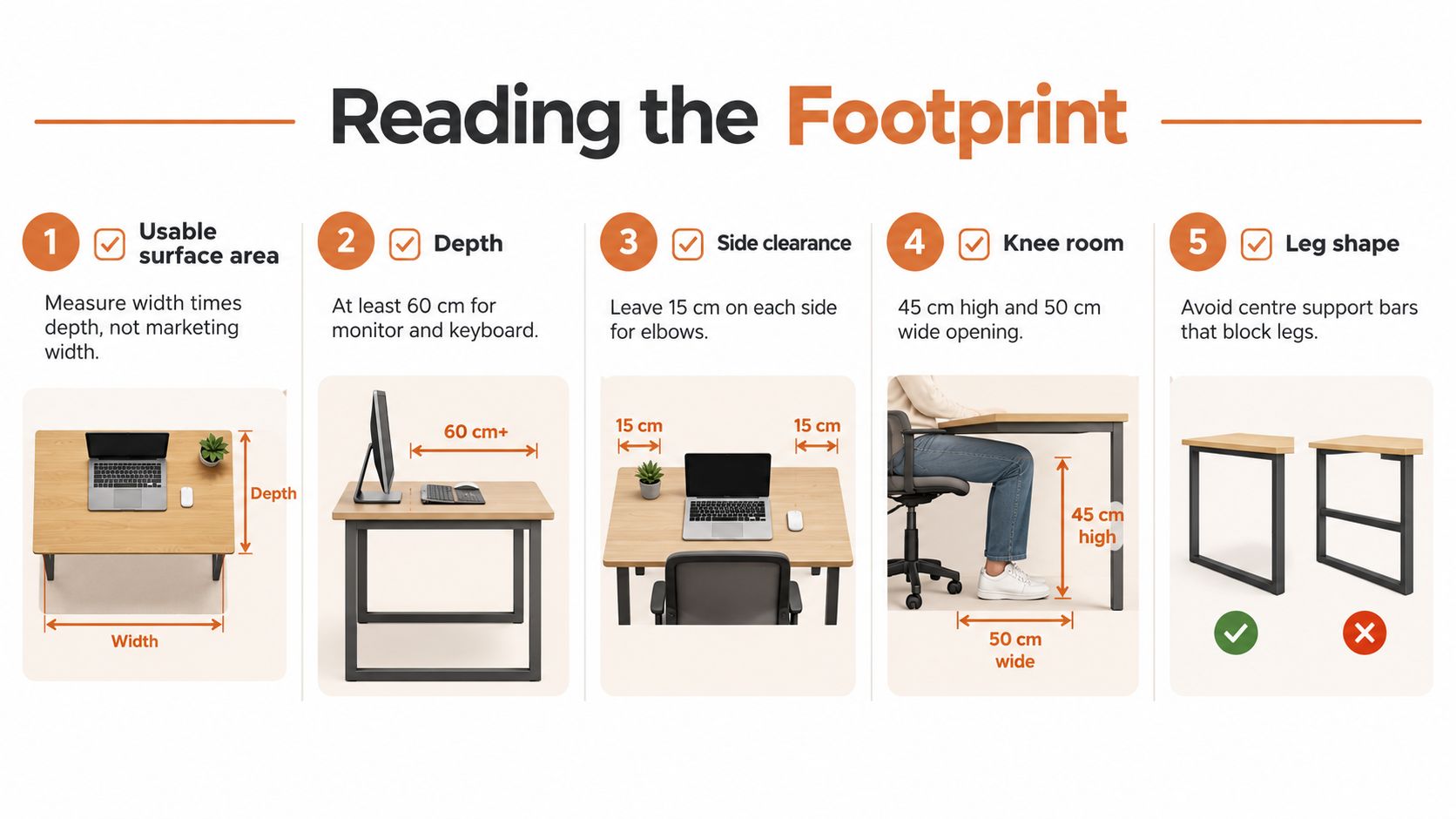
What to verify before you buy
- Usable surface area: Measure width by depth, not marketing width alone.
- Depth: Make sure there’s enough front-to-back room for monitor, keyboard, and mouse without pushing the screen to the edge.
- Side clearance: Leave space for your elbows and for the movement your hands make while typing.
- Knee room: Check the opening height and width where your legs go, not just the outside dimensions.
- Leg shape: Skip centre supports and crossbars that cut into leg movement or chair clearance.
A compact desk works best when the footprint is honest. The dimensions on the page need to match the space your body actually uses.
The fastest way to avoid regret is to bring a tape measure to every product page and floor model. If the desktop fits the wall but not your chair, your knees, and the gear you use every day, it isn’t the right desk.
Ergonomics That Survive a Smaller Surface
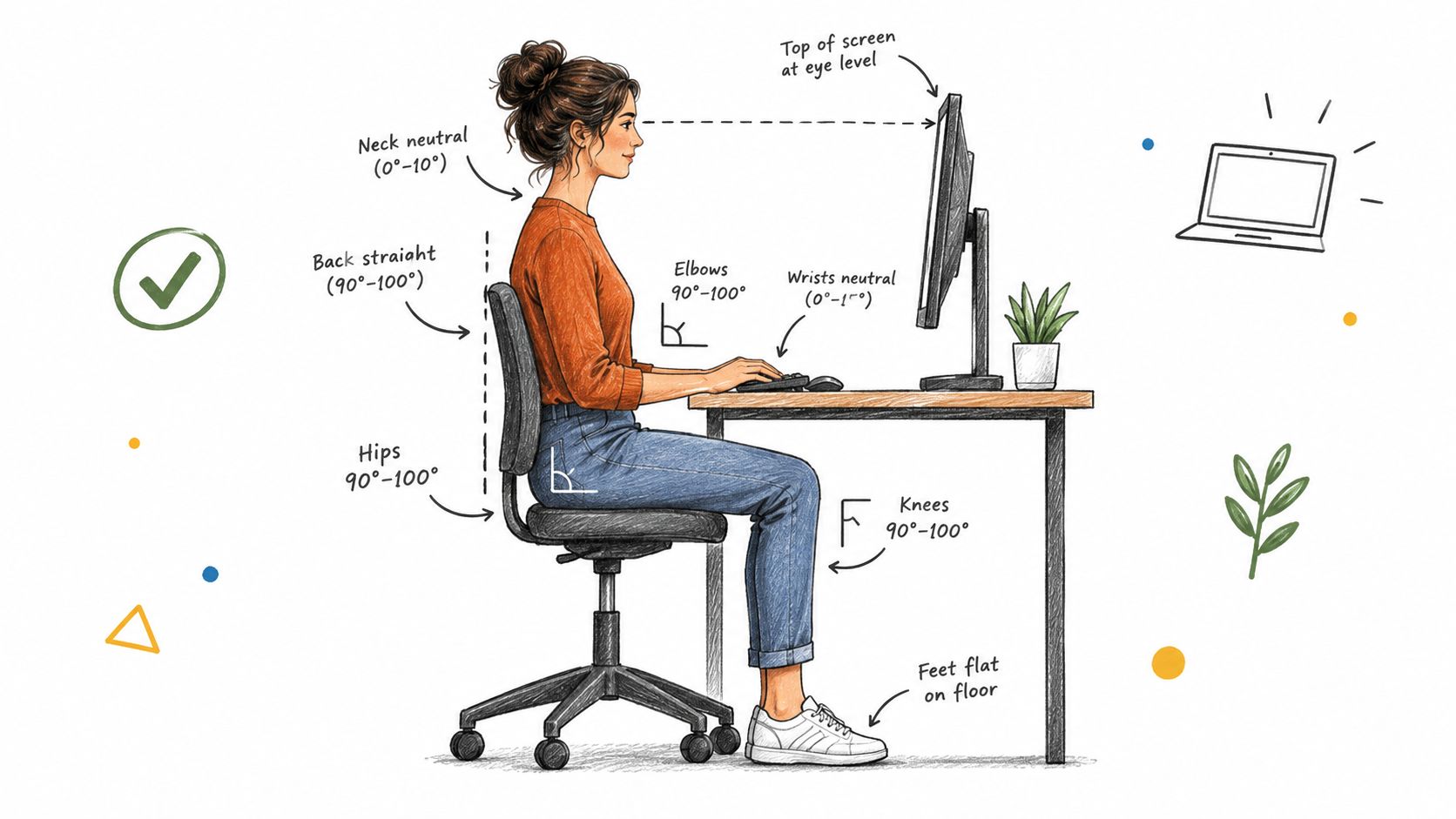
A smaller desk doesn’t have to mean a worse posture. California’s Department of Industrial Relations recommends starting with the monitor about an arm’s length away and keeping the top line of text at or slightly below eye level, while OSHA specifies a minimum viewing distance of about 20 inches (50 cm) for computer workstations California DIR guidance. That’s the test for a compact top, if the desk can’t support that distance, it’s too shallow for the job.
Adjust the setup around the desk, not against it
A small desk with fixed legs can still be ergonomic if the chair does the heavy lifting. California’s ergonomics guidance recommends setting the chair so the feet are flat, the knees sit level with or slightly below the hips, and the thighs stay roughly parallel to the floor California ergonomic workstation guide. OSHA also calls for neutral head and neck posture, relaxed shoulders, supported elbows, straight wrists, and enough room for the keyboard and mouse.
That means the chair height comes first. If the desktop is still too high after the chair is right, a keyboard tray or footrest is usually a better fix than raising the seat until your feet dangle. The desk itself is only one part of the system.
When to use accessories instead of fighting the top
A shallow desk can still work if you move some parts off the main plane. A monitor arm or rear shelf can create the extra room needed for the screen, while the keyboard stays on the main surface. A laptop stand can do the same thing for a laptop-only setup, especially when you pair it with an external keyboard and mouse. The goal is to protect forearm support and keep the screen from drifting too close.
If you’ve ever found yourself pulling the keyboard to the front edge just to make room for the monitor, that’s the warning sign. The desk isn’t too small because of its width. It’s too shallow for the viewing distance and arm support you need.
<iframe width=“100%” style=“aspect-ratio: 16 / 9;” src=“https://www.youtube.com/embed/1vNbBCGgfe8” frameborder=“0” allow=“autoplay; encrypted-media” allowfullscreen></iframe>
Practical rule: If the chair is set correctly and the feet still don’t rest comfortably, don’t “solve” it by raising the seat. Fix the desk height, add support, or change the hardware.
A compact workstation succeeds when the posture cues remain stable. If the monitor height, elbow angle, and foot support change every time you sit down, the desk is forcing the body to adapt too much.
Storage and Multipurpose Designs That Earn Their Footprint
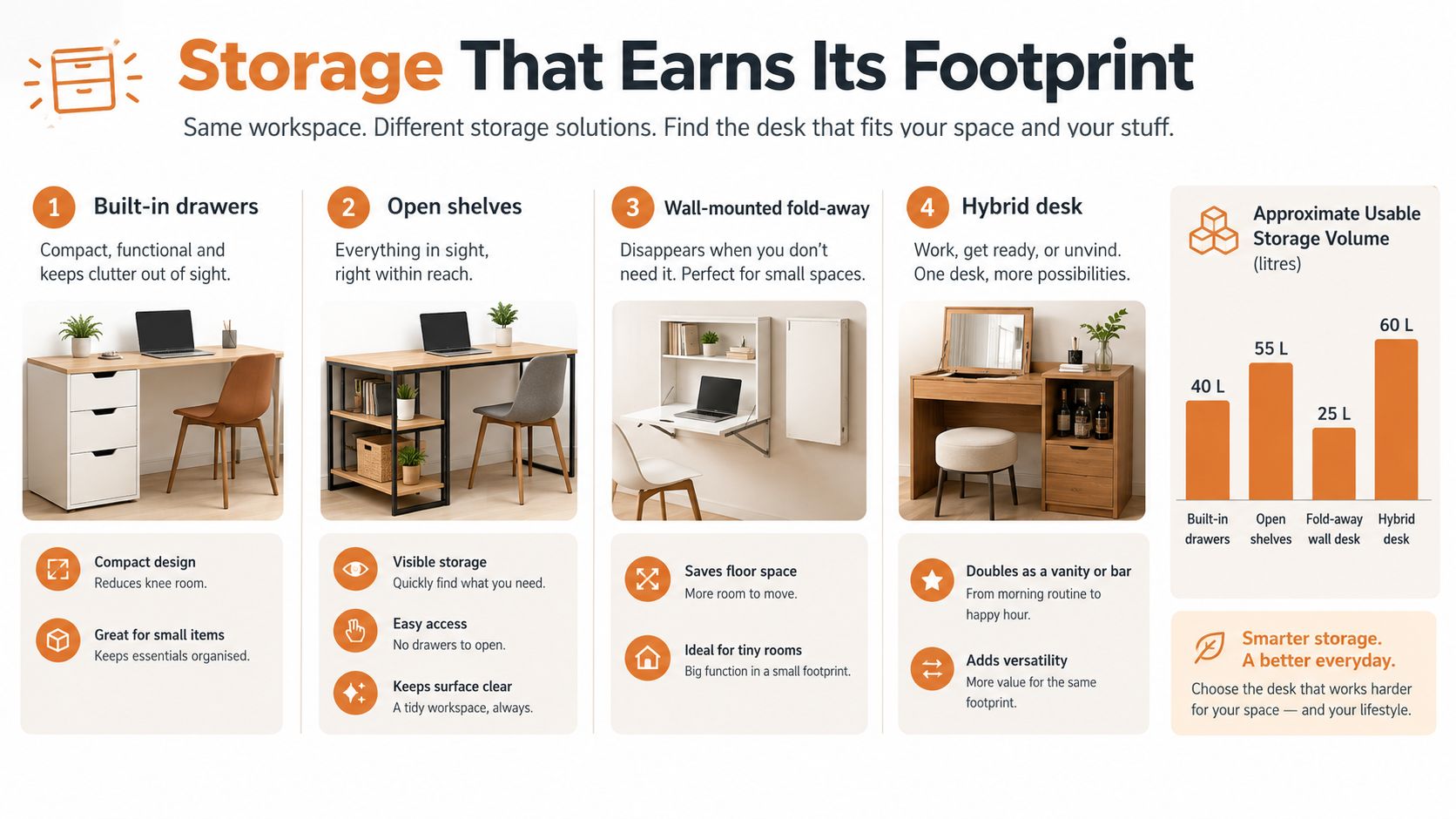
Storage becomes more valuable, and more dangerous, once the desk gets smaller. Every drawer, shelf, and side cubby either protects the surface from clutter or steals the leg room you need to sit comfortably. The right choice depends on whether you want the storage hidden, visible, or removed from the desk altogether.
Compare the main layouts
A built-in drawer can be brilliant for pens, notebooks, and chargers, but it often reduces knee room and makes the underside feel cramped. Open shelves keep supplies visible and easy to reach, which is useful when the desktop is tiny and every item needs a home. A wall-mounted fold-away desk saves floor space and suits rooms that need to change function quickly, while a hybrid desk can pull double duty as a vanity, craft table, or bar surface when work is done.
Pick storage by what you actually hide
If the desk is visible from the bed or sofa, hidden storage matters more than raw capacity. Closed drawers reduce visual clutter, but they’re only worth the trade if they don’t squeeze the chair position. Open shelving works well for books, headphones, and labelled boxes, yet it turns messy quickly if you use it as a dumping ground.
For very tight rooms, I’d rather see a slim cart or wall shelf do the storage work than force everything into the desk frame. A separate piece can keep the desktop cleaner and preserve the main work zone for what matters most, the keyboard, pointing device, and whatever you need within immediate reach. A desk that carries too much inside its own frame often ends up feeling heavier than the room can support.
The test I use in real homes
If the desk is also going to serve as a vanity, sewing table, or dining backup, check whether the surface still feels calm when the work items are put away. The best multipurpose designs don’t just hold more objects. They make the room read clearly as “finished” when the workday ends.
Deskbound is one editorial option in this space, since it publishes compact-desk reviews and setup guides aimed at small home offices. That kind of coverage is useful when you’re comparing storage layouts, cable handling, and footprint efficiency side by side.
Where to Put the Desk So the Workday Has a Shape
Placement changes everything. A desk in the wrong part of the room can make even a good chair and monitor feel awkward, while a modest desk in the right spot can feel settled from the first day. The biggest issue isn’t the desktop, it’s what the desk faces when you’re trying to work and what it reminds you of when you’re trying to stop.
Face the room with intention
A desk directly facing a bed or TV keeps work and rest in the same visual line, which makes it harder to switch modes. Putting the desk near a side wall or angled toward a window usually gives a cleaner separation between focus and downtime. Side light is also easier to manage than light from behind you, which tends to create glare and make screens harder to read.
The other part of placement is what the room shows you when you sit down. If your eye lands on laundry, a stack of unopened mail, or the edge of the bed every time you open the laptop, the space keeps asking for attention. That’s not a desk problem alone. It’s a room-layout problem.
Give the end of the day a visible cue
A small workstation needs a shutdown signal. That might be a closed drawer, a monitor cover, a box where the keyboard and mouse go after hours, or a simple routine that clears the desktop before you walk away. The point is to create a boundary the room can recognise, not just one you intend in your head.
When a workspace shares a room with daily life, the end-of-day ritual matters as much as the desk itself.
That boundary also helps with mental clutter. A desk that stays semi-open all evening keeps work present in the room, even when you’re not using it. Closing the surface, hiding cables, or folding the desk away gives the room back its original identity.
A good placement makes the desk feel like part of the room instead of a permanent interruption to it. That’s why the same desk can feel generous in one corner and exhausting in another. The difference is the sightline, the light, and the way the room closes itself after work.
Choosing Between Compact, Foldable, and Wall-Mounted Designs
The right form factor depends on how often the desk stays open. If you work from home every day, a fixed compact desk usually offers the least friction. If your work pattern shifts between home and office, or your room has to serve another purpose by night, a foldable or wall-mounted option can be the smarter fit.
Match the desk to the routine
Statistics Canada reported that 82.6% of employed Canadians commuted to work in May 2025, up 1.3 percentage points from May 2024, while the share mostly working from home declined CBC reporting on Statistics Canada data. That makes hybrid-ready furniture more relevant than the old assumption of a permanent home office. Many workers now need a setup that can be deployed, packed away, and reassembled without turning every workday into a furniture project.
A fixed compact desk works when the workstation can stay in place most of the time and the room has a reliable corner or wall. A foldable or convertible desk fits better when the desktop must disappear between shifts. A wall-mounted or floating desk is strongest when floor space is extremely tight and the user can live with lighter storage and a simpler setup.
Use a decision rule, not a mood
Choose the desk that matches your least forgiving day, not your best one. If you hate setup friction, don’t buy a fold-away desk just because it looks neat in photos. If the room needs to function as a bedroom or living room after hours, don’t force a bulky fixed desk into the middle of it.
Before you buy, verify three things. First, the desk can support the screen distance and elbow room you need. Second, the packed or open state still leaves the room usable. Third, cables and accessories don’t turn teardown into a tangle.
The smallest wrong desk is still the wrong desk. A slightly larger one that fits the routine, the room, and the body usually wins in the long run.
Putting It All Together and Next Steps
The right compact desk decision follows a clear order. Start with footprint, because if the top and leg space don’t fit your body and gear, nothing else matters. Then check ergonomics, because a small desk only works when the chair, monitor, and keyboard can still support neutral posture.
After that, decide how much storage the desk itself should carry. A desk that hides clutter is useful, but only if it doesn’t steal legroom or force awkward reaching. Then place the desk where the room can support a real workday and a clean shutdown. Finally, choose the form factor that matches your routine, not just your taste.
A quick checklist helps every time you shop or rearrange:
- Measure the footprint: Confirm width, depth, and knee opening before anything else.
- Check the posture setup: Make sure the chair, monitor height, and viewing distance can work together.
- Decide on storage: Keep built-ins only if they earn their space.
- Study the room: Look at sightlines, glare, and what you’ll see when work ends.
- Match the form factor: Fixed, foldable, or wall-mounted should follow your weekly routine.
The most reliable compact workstations don’t pretend the room is bigger than it is. They use the room, and that makes them easier to live with.
Deskbound covers compact desk reviews, cable management, and small-space setup guides for people who need a workstation that fits real rooms, not showroom layouts. If you’re refining a small home office desk setup, visit Deskbound for practical buying guidance and room-by-room ideas you can use right away.