Cable management is the one category this site has somehow never covered, which is strange, because it is the thing people notice every time they look down. This week is seven ways to deal with it, from hiding a power strip to holding a charging cable at the desk edge, and we are skipping the usual work from home and tech desk picks to make room. Prices move around, so check the current one before you buy.
1. D-Line Cable Management Box, Large, White

The power strip is the root of most desk clutter. It sits on the floor with six cables fanning out of it, collecting dust, and there is no tidy way to arrange it because the strip itself is the ugly part. This box puts a lid over it: cables enter through slots at each end, the strip lives inside, and what you see is a plain white box instead of a nest.
D-Line is a cable management manufacturer rather than a rebadger, and the large size is built around a standard power strip rather than being a generic storage bin with holes cut in it. The measurement to check before ordering is not the strip on its own, it is the strip with everything plugged into it. A strip that fits lengthwise can still be defeated by two chunky wall adapters, which sit wider than the plug they replace. Leave it loosely packed rather than stuffed, since a sealed box full of transformers holds heat.
What you gain: The floor under your desk reads as one clean object instead of a tangle.
D-Line Cable Management Box on Amazon
2. D-Line Cord Cover, Paintable Raceway, White, Medium
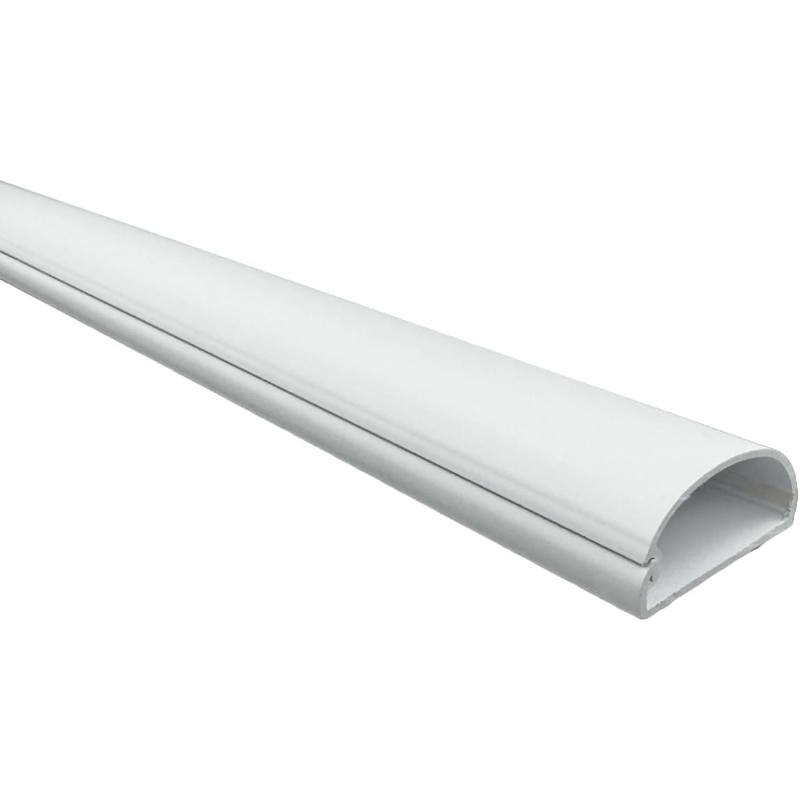
The cables that bother people most are the ones crossing open wall, usually the run from a wall mounted monitor or a desk that does not sit against an outlet. Loose cords there look temporary no matter how neatly you clip them. A raceway is a half round channel that sticks to the wall, opens along its length so you lay the cables in, and closes over them.
The reason to take the paintable version is that the point of a raceway is to disappear, and white on an off-white wall still reads as a stripe. This one takes wall paint, so it can be matched to what is behind it. Test the adhesive on a short offcut first: it holds well on smooth painted drywall and much less well on textured paint, wallpaper, or a wall painted within the last few weeks. Removal later can take paint with it, so this is a decision for a wall you are not planning to repaint soon, and the channel holds a few cables rather than a whole bundle.
What you gain: The wall run stops being the first thing you see when you walk in.
3. JOTO 130 Inch Cuttable Cable Management Sleeve
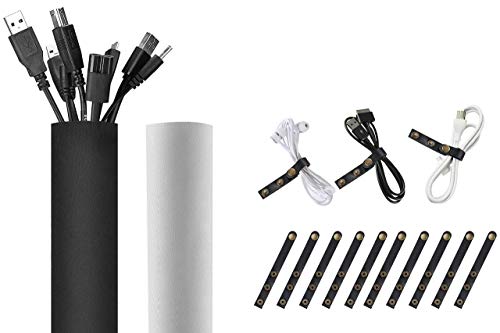
Behind the desk, the problem is different. Nothing needs hiding from the room, it just needs to stop being six separate cables sagging at six different heights. A neoprene sleeve wraps the whole run into one trunk that you can route in a single line, and it closes with hook and loop along its length rather than a zipper, so you can open it anywhere.
Cuttable is the feature that matters, because a fixed length sleeve either leaves a stub or falls short, and this one you cut to the run you actually have. The honest caveat is what bundling does: cables wrapped together trap heat, and changing one of them becomes an unwrap and rewrap job rather than a thirty second swap. If you rotate laptops, docks, or peripherals often, loose ties will annoy you less than a sleeve will.
What you gain: One cable trunk behind the desk instead of six independent droops.
JOTO Cable Management Sleeve on Amazon
4. VELCRO Brand ONE-WRAP Thin Ties, Black, 8 x 1/2 Inch
Most people reach for zip ties, then cut them off two weeks later when something changes, then run out. ONE-WRAP is self gripping on both faces, so a tie wraps onto itself at any length and comes undone with a pull. That makes it the right tool for the cables you genuinely do re-route: the laptop cable, the monitor cable, anything attached to hardware you move.
Buying the large count pack is the sensible call here, because these get used far faster than expected once they are in a drawer, and having to ration them defeats the purpose. Two limits worth knowing. The thin format is sized for cable bundles rather than thick trunk runs, and it can slip if you cinch too many cords into one wrap. And for a permanent run that will never be touched again, a zip tie costs less and holds tighter, so this is not the answer to every strap on the desk.
What you gain: Re-routing a cable takes a pull instead of scissors.
VELCRO Brand ONE-WRAP Ties on Amazon
5. Anker Magnetic Desktop Cord Holder, White
This solves the small daily irritation rather than the visual mess: the charging cable that slides off the back of the desk every time you unplug your phone, so each use starts with fishing it up off the floor. The holder sticks to the desk near the edge and keeps the cable ends parked where your hand expects them, held magnetically so they release with a tug.
It sticks to wood, marble, metal, and glass, which covers most desk surfaces including the glass tops that defeat clip-on solutions. Two caveats. The adhesive pad is close to a one-time decision, since peeling it up to reposition costs most of its grip, so hold a cable to the spot and mime the motion before committing. And it holds cable ends, not cable runs, so a stiff or heavy cable under tension can pull loose. This is a desk edge fix, not a management system.
What you gain: The charging cable is where you left it instead of on the floor.
Anker Magnetic Desktop Cord Holder on Amazon
6. AGPTEK Flat Cable Clips, Adhesive, White, 100 Pack
Some cables cannot go in a raceway or a sleeve because they need to follow a path: along a baseboard, up a door frame, around a corner to a router in another room. Small adhesive clips let you pin a thin cable to that line so it looks deliberate rather than draped, and at a hundred in a pack you can do a whole room without deciding which run deserves them.
These are sized for thin and flat cables, ethernet in particular, which is exactly the cable most likely to be crossing a room in a home office. That is also the limit: a thick power cord will not seat in them, so do not buy these expecting to tame a monitor cable. Adhesive clips also need a clean, smooth, dry surface, and a dusty baseboard is the usual reason they let go a month later. Wipe the path down first, and expect to touch up paint if you remove them later.
What you gain: The long ethernet run follows a line instead of cutting across the floor.
AGPTEK Flat Cable Clips on Amazon
7. MobileVision Bamboo Device Organizer, 10 Slots
The last of the desk clutter is usually not cable at all, it is the devices on the ends of them lying flat and taking up surface. A slotted bamboo stand turns a phone, a tablet, and a laptop into three vertical objects in one footprint, which is the cheapest way to get desk surface back without moving anything off the desk.
Bamboo rather than plastic is worth the difference here for a piece that sits in the open and gets touched all day. The thing to check is slot width against what you actually own, since fixed slots are generous with bare devices and tight with a thick protective case or a large laptop, and a device that does not seat properly leans. Note also what this does not do: it stores the devices, it does not route the charging cables to them, so pair it with something from earlier in this list or you have tidied the devices and left the cords.
What you gain: Three devices stand in the space one of them used to lie in.
MobileVision Bamboo Device Organizer on Amazon
A year from now the two that will still be earning their place are the D-Line box and the ONE-WRAP ties, for opposite reasons: the box solves the mess once and then you forget it exists, while the ties keep working precisely because your setup keeps changing. The raceway is the one to think hardest about before committing, since it is the only pick here that leaves a mark when you change your mind.